
If you’re looking for how to use AI for SEO without getting penalized, you’re in the right place. I learned this the hard way.
In 2026, AI is everywhere.
When I hit a question I can’t answer, my first instinct is to throw it to AI. When I first started this website, I was heavily dependent on it too — especially when it came to writing. I’d give AI a keyword, let it generate the full article, and I’d just copy, paste, and hit publish. I even had AI generate the images.
I “wrote” several pieces this way.
None of them got indexed by Google.
After hanging out on Reddit, digging through Google’s official documentation, and browsing SEO forums, I finally figured out what went wrong:
First, the AI smell was too strong.
The text was mechanical and redundant. It read like a machine talking, not a human having a conversation. You could smell the “machine stench” a mile away — and so could Google.
Second, there was no “me” in the article.
No process. No evidence. No data. No real experience. The entire piece was filled with “studies show” and “experts say,” but not a single line that said “this is what I tried” or “here’s what I think.”
It was empty thinking.
Content without real experience is like a court statement without evidence — who’s going to believe you?
Third, AI can’t handle long-form content.
AI is at its best writing in chunks of 200–450 words. Push it to generate 3,000 words at once, and it falls apart — logic jumps, topics drift, structure turns templated, and readability tanks.
Ask AI to run 3,000 meters, and it will literally stumble.
Once I understood these three problems, I changed my approach. I tested, revised, and optimized over and over until I landed on a stable workflow.
This article is the full record of that process.
I won’t teach you how to build automated workflows — I’m not familiar with Dify, let alone Coze. I only know one way: AI tools + your own brain + a little patience.
The process isn’t complicated. Just follow it once, and you’ll get it.
If you’ve ever been through the “AI writes → publish → no index” frustration, this guide should help.

Let’s dive in.
Part 1: Positioning AI for SEO Writing — What It Can and Can’t Do
Before we get into the how-to, let’s get the positioning right.
A lot of people ask me: “Will Google penalize me if I use AI for SEO writing?”
The most common beginner mistake — letting AI write for you while you act as a copy-paste machine. But AI has no opinions, no experience, no perspective. It only mimics patterns. Expect an imitator to produce original work, and you get text that looks like an article but says nothing.
The right way to use it — AI is scaffolding; you’re the builder. The scaffolding goes up fast, but you’re the one who lays the bricks.
AI is good at research, summarization, drafting, and grammar checks. It does these fast and without thinking.
You’re good at judging what information is useful, what’s fluff, and whether an argument holds up. These are things AI can’t do — only you can.
Google’s official May 2026 guidelines say something similar: generative AI is particularly helpful for researching topics and structuring content, but using it to produce large volumes of low-value pages may violate spam policies.
So there’s only one direction to go: That’s the right way to use AI for SEO content.
Once you get that right, everything else falls into place.
Part 2: Preparation — The Basic Tools You’ll Need
Before we start, get your tools ready. It’s not complicated — just two things.
2.1 The AI Tool: DeepSeek
The tool I use is DeepSeek. Why? It’s free and gets the job done. Just log in via the web version and start working — no installation required.

DeepSeek isn’t your only option. Different AIs have different strengths:
- ChatGPT / Claude: Best for conversational, easy-to-understand content
- Perplexity AI: Good for data analysis and gathering industry background
- Bard / Gemini: Useful for multi-angle comparisons and broadening your perspective
If you want to keep it simple, using just DeepSeek for the entire workflow works perfectly fine. That’s what I do.
2.2 Auxiliary Tools (Optional)
These three are nice to have, but you can write without them:
Grammarly: For checking spelling and grammar in English articles. The free version is enough.
SEO Plugin: If your site is on WordPress, install Yoast SEO or Rank Math. It will remind you about things like “keyword missing,” “paragraph too long,” or “image missing Alt text.” Not required, but beginner-friendly.
Google Search Console: This one’s worth highlighting — it’s free, but you must register.
After you publish, this is where you’ll see whether you’re getting impressions, clicks, or rankings. You can publish without it, but it’s like tossing your article into the ocean — you’ll get no feedback at all.
With these tools, you’re ready to use AI for SEO writing — let’s jump straight in.
Part 3: The Complete AI-Assisted SEO Writing Workflow
Here are the 8 steps I’ve refined through trial and error. I stepped on every single one of these landmines, and I have a fix for each.
Don’t let the number put you off. Once you run through it once, you’ll see — it’s not complicated.
Workflow Overview (Screenshot This for Reference)
Define Keyword → AI Research → Build Outline → Draft with Constraints → AI Review → Manual Polish on Key Spots → Publish & Submit → Optimize with Data
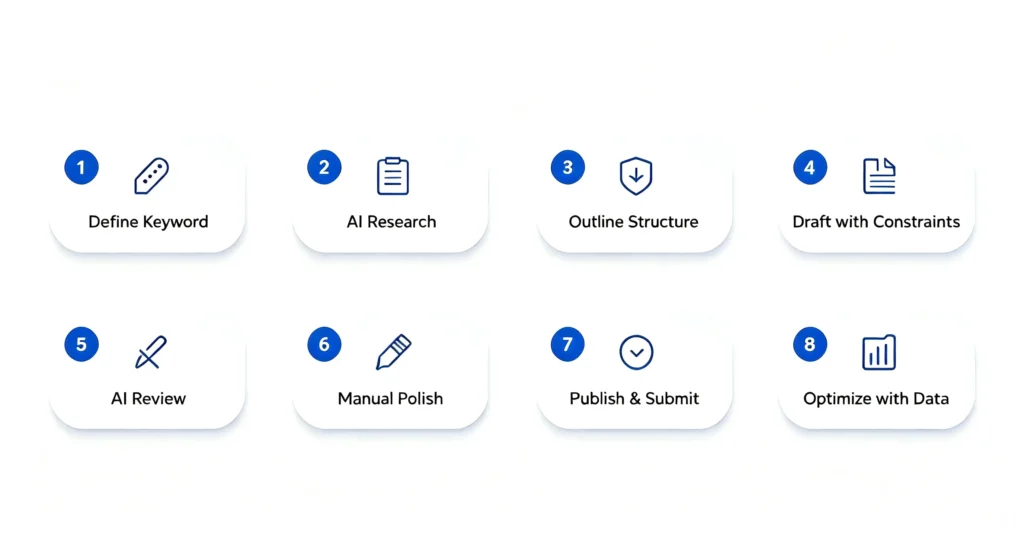
Follow this line, and you won’t drift off course.
Step 1: Lock Down Your Keyword First
This is the easiest step to skip, but everyone who skips it comes back to fix it later.
I made this mistake early on — I’d pick a topic at random, pay zero attention to search volume or competition, have AI generate the article, hit publish, and wait for rankings. Google never indexed them, let alone ranked them.
Later I learned that before using AI for SEO writing, I need to confirm three things. 10 minutes is all it takes:
| What to Confirm | Explanation | My Example |
|---|---|---|
| Primary Keyword | The term you want users to find your post with | how to use ai for seo |
| Search Intent | Are they looking to learn, to buy, or to find a specific site? | Informational — they want to know “how to use AI for SEO” |
| Article Goal | What specific problem does this article solve for readers? | A ready-to-use, safe AI-assisted writing workflow for beginners, based on my own mistakes |
Write these three things at the top of your document. You can also feed them directly to AI so it understands your intent. Having them on paper (or screen) helps you stay on track. If you point in the wrong direction, everything that follows is wasted effort.
For a complete guide on how to choose the right keywords — including search volume, competition level, and long-tail keyword research — check out my full tutorial: SEO Basics: Research (Part 1) – The Ultimate Step-by-Step Keyword Research Guide for Beginners 2026. I won’t dive into that here.
Step 2: Let AI “Research,” Not “Write”
As mentioned earlier, when you let AI generate a full article and publish it directly, the root problem is that AI is “inventing” rather than “checking.” It’s not looking up facts — it’s guessing one word at a time based on statistical patterns. The sentences look smooth, but that doesn’t mean they’re grounded in facts.

Think of it like a friend who’s great at finishing your sentences. Half the time, they get it wrong.
So the approach has to flip: don’t let AI write the article for you; let it help you research.
Here’s what I do:
First, gather authoritative sources.
Give AI your topic and ask it to list relevant authoritative references — Google’s official documents, well-known SEO blogs, industry reports, and so on. AI’s training data already contains plenty of public information to get you a solid starting point.
Second, summarize the consensus.
Based on those sources, have AI distill the core points that the industry generally agrees on. This gives you a quick foundation on the topic.
Third, give me facts, not paragraphs.
This is the most critical part. What you want from AI is bullet points, not copy-paste-ready paragraphs. You’re after facts, data, and key takeaways — not a fully written section that looks publishable.
One more direct method:
Search your keyword on Google, grab the links or full text of the top 5 articles, and feed them to AI. Ask it to read and summarize each one’s core ideas and structure.
The output from this stage is a “Research Notes” document — just facts, ideas, and data points, with zero polished paragraphs. That document becomes your raw material for writing.
Step 3: Do the Human Thing First — Build the Outline
Once you’ve done the research, you’re ready to actually use AI for SEO writing.What’s next?
Jump straight into letting AI write? Not so fast.
Start by building the outline.
If you ask AI for a structure upfront, you’ll typically get something like: What is X → Why it matters → How to do it → FAQ. The logic flows, but it’s overly “textbook.”
Google has seen that pattern too many times and may flag it as templated content.
So take the AI’s baseline structure and turn it into your own “human version.”
Step 1: Have AI generate a baseline framework.
Prompt example:
“Based on our research notes, please generate a basic outline for an article on ‘how to use ai for seo,’ with H2 and H3 levels only.”
AI will hand you a decent-looking framework — intro, steps, FAQs, and all.
The catch? It’s too “standard.”
Step 2: Make it your outline.
AI can’t do this part — you have to. Looking at AI’s draft, ask yourself:
- Is this how a normal person would structure this? Or is this how every SEO article does it?
- Does my personal experience fit here? Where does it go naturally?
- Are there sections I have zero experience with and would have to fake? Cut them.
- Are there real stories I want to tell, but there’s no room for them? Add them in.
Once you’ve done that, the outline becomes yours. It may have rough edges; it might not be “perfectly” structured. But it reads like someone who’s actually done the thing.
Google likes that.
Step 4: Write in Chunks — But with Clear Constraints
We mentioned earlier that when you use AI for SEO writing, generating a full article in one go causes quality to crash. So here’s the alternative: write in chunks, one section at a time.
This step demands the most patience, and it’s the one that determines whether your final article sounds “human” or “AI-ish.”
Give AI one H2 or H3 heading at a time and ask for 300–500 words. Once it generates that block, edit it yourself immediately — adjust wording, add your personal stories, cut fluff. Then move to the next.
One critical rule: every AI prompt must include clear constraints.
My standard five constraints:
- Don’t repeat the keyword unnaturally
- Write in a way that explains things to a beginner
- Use synonyms and alternative phrasing
- Cover only one point per paragraph
- Keep each generation between 300–500 words
How to do this in practice:
Take your final outline, use those five rules as your fixed requirements, and ask AI to start writing from the beginning. Generate one small section at a time.
After AI generates each chunk, edit it immediately. Once it’s clean, move to the next H2.
Remember: Don’t ask AI to generate everything at once and edit later. Edit as you go, 500 words at a time, one module after another.
A 3,000-word article, broken into 6–8 chunks, each handled individually, yields far better quality than one massive generation.
If the article gets long and AI’s memory becomes an issue, you can also feed just the specific sub-section outline back to AI so it focuses only on that chunk.
Step 5: Have AI Play “SEO Reviewer,” Not “Author”
Once all sections are drafted, don’t publish yet — that’s not how to use AI for SEO the right way.
Send the full piece to another AI model — or simply start a fresh chat in DeepSeek, like I do — and have it take another pass. Don’t use the same context window, or AI will follow your earlier tone and miss real issues.
One key rule: AI reviews; AI does not rewrite.
My prompt looks like this:
“Here is the full draft of my article on ‘how to use ai for seo.’ Act as an SEO reviewer and do three things:
- Check if the keyword is overused or feels unnatural
- Flag any paragraphs that are fluff or low-value
- Suggest improvements for structure and readability (don’t rewrite it)
Structure your feedback like this:
- Keyword issues: tag specific locations
- Fluff paragraphs: tag specific locations
- Structural suggestions: point to specific headings
Give recommendations only — do not rewrite my content.”
AI will give you a detailed feedback list, such as:
- Keyword issue: the phrase
how to use ai for seoappears twice too close together in paragraph 3 - Fluff: the opening of paragraph 6 — “in today’s era of rapid AI development…” — adds zero value
- Structural: the content under H2 “Step 4” is too long; consider splitting it into two sections
You can pick and choose which feedback to act on. If it’s right, fix it. If not, skip it.
Core principle: You are the author; AI is the advisor.
Step 6: Only Polish the “Make-or-Break” Spots Manually
This is the final round of human editing.
Since Step 4 already had you editing each chunk one by one, this round isn’t heavy. You only need to look at three things:
First: The title
The title decides whether people click. Ask yourself two questions:
- Does the title make clear what problem this article solves?
- Does it sound like something a human would write?
If the title feels overly structured, formal, or lacks emotion — that’s classic AI style. Rewrite it. A good title doesn’t need to be flashy; it just needs to sound like it’s spoken by a real person.
Second: The first 100 words
The opening decides whether people stay. Google also frequently uses this part as the source for its snippet.
Check whether the first two sentences immediately state what the article is about and what value it offers. If it starts with “In today’s digital era…” — delete it. Start solving the problem with your first sentence. No warm-ups.
Third: All subheadings (H2/H3)
Subheadings decide whether readers scroll down, and they also help search engines understand your article’s structure. Check that every subheading actually conveys meaningful information.
Generic labels like “Introduction” or “Conclusion” don’t count as information — readers can’t tell what that section covers. A strong heading looks like “Step 4: Write in Chunks — But with Clear Constraints” — you know exactly what you’re about to read.
Those three spots are all you need. I rarely touch the middle of the article unless Step 4 had gaps.
Step 7: Publish and Submit — Don’t “Perfect” Yourself Into Inaction
I used to let drafts pile up in my folder, until it hit me: unpublished is unwritten. So just two checks and hit publish.
Before publishing, do a quick pass on:
- Is the URL clean? (like
how-to-use-ai-for-seo) - Do images have Alt text?
Check both and publish.
What about article images?
DeepSeek can’t generate images directly. You can use other AI image tools, or ask DeepSeek for image suggestions — describe the placement, subject, and style — and use its recommendations to generate images elsewhere.
After publishing, go to Google Search Console and submit your URL for indexing.
Just open GSC → URL inspection → paste your article URL → click “Request indexing.” That speeds up Google’s discovery of your post.
Then: no more tweaking. No anxiety.
Avoid making major changes within 48 hours of publishing; let Google crawl it first.
SEO isn’t a one-and-done project. Good articles are refined after they go live, not in draft limbo.
That’s how to use AI for SEO and get indexed.
Step 8: Let Data — Not Feelings — Drive Your Edits
The article is out. Now wait.
Many beginners get anxious the next day — “Why no ranking? Why no traffic?” — and start making random edits to titles, content, and structure.
I did that too. Usually made things worse.
Best practice: wait 2–4 weeks.

After a month, open Google Search Console and check the data:
| Scenario | What It Means | What to Do |
|---|---|---|
| Zero impressions | Google hasn’t started showing your page | Don’t touch it; wait 2 more weeks |
| Impressions but CTR below 2% | People see it but don’t click | Update title and meta description |
| CTR fine, ranking 10–20 | Solid but not strong enough | Add depth — more examples or data |
| Ranking in top 10 | Direction is right | Build internal links to it |
| No movement at 6 months | Topic or approach may be off | Write a fresh post instead of endlessly editing the old one |
Principle: never optimize based on feelings. Optimize based on data.
Check the data, make one move, then wait another 2–4 weeks. SEO is a marathon, not a sprint.
That’s what it really means to use AI for SEO the right way — let the data tell you.
Workflow Recap
| Step | One-Sentence Summary | Core Output |
|---|---|---|
| Step 1 | Keyword + intent + article goal | Triple-confirmation checklist |
| Step 2 | AI researches, doesn’t write | Research notes (raw facts) |
| Step 3 | AI gives baseline outline; you humanize it | Your custom outline |
| Step 4 | Write in modules, ≤500 words each | Drafts refined section by section |
| Step 5 | AI reviews and recommends, doesn’t rewrite | Feedback checklist |
| Step 6 | Human polish only on title, intro, subheads | Final article |
| Step 7 | Publish + submit to GSC, don’t overthink | Live + indexed |
| Step 8 | Act on Search Console data, not gut feelings | Data-backed optimization plan |
Part 4: Final Thoughts+ FAQ
That wraps up how to use AI for SEO — from start to finish.
Three core takeaways:
First, AI builds the frame; you add the flesh. That’s the right way to use AI for SEO.Don’t let AI write on your behalf. Let it handle the slow, repetitive work.
Second, write in chunks and edit as you go. AI can’t reliably hold together a 3,000-word generation. Break it into pieces, edit each one, then move on.
Third, make decisions based on data, not feelings — that’s how you use AI for SEO like a pro. Wait 2–4 weeks after publishing, check Search Console, then decide what to adjust.
The process isn’t complicated — patience is the only real requirement. Run through it once, and you’ll feel the difference.
If you’ve been stuck in the “AI writes → publish → no index” loop, this guide should help you skip a few wrong turns.
One last thought: SEO is not a one-time project. Articles get better in the wild, not in draft limbo. Publish first, optimize later, and keep going. That beats obsessing over a “perfect” draft every time.
Can I use AI to write SEO content without Google penalising me?
Yes, if you use AI as an assistant, not a replacement. Focus on human editing, adding personal experience, and ensuring every piece meets Google’s helpful content guidelines.
How do I stop my AI-written articles from sounding robotic?
Break the content into small sections. Write rough drafts yourself, use AI to polish, then manually add stories, opinions, and casual phrasing. Avoid long AI-only passages.
What’s the best free AI tool for SEO writing?
DeepSeek is an excellent free option. It can research, outline, and draft content. Paired with a grammar checker and Google Search Console, you get a complete SEO content toolkit at zero cost.
How many words should I let AI generate at once for SEO content?
Keep each AI generation to 300–500 words. Longer outputs tend to lose focus and quality. Edit each chunk immediately before asking for the next section.
Is AI content automatically indexed by Google?
No, AI content isn’t indexed automatically. You need to manually submit URLs in Google Search Console, ensure the content is original and valuable, and wait for Google to crawl and evaluate it.
Call to action:
- Bookmark this guide and run through Step 1 to Step 8 when you write your next piece
- Share it with other SEO beginners who’ve been burned by the same AI content traps
Appendix 1: Complete Prompt Templates
All the prompts used throughout the article, collected here for easy copying.
1. Ask AI to find authoritative sources (Step 2)
“Please help me find authoritative sources on ‘[your keyword],’ including Google official docs and well-known SEO blogs. List the key points from each.”
2. Ask AI to summarize consensus views (Step 2)
“Based on these sources, distill 3–5 core points that are broadly agreed upon in the industry. List them in bullet points with sources.”
3. Ask AI to return facts, not full paragraphs (Step 2)
“Don’t write an article. Just give me the key facts, data points, and direct quotations from each source in bullet-point form.”
4. Ask AI to analyze SERP articles (Step 2)
“Here are the full texts of the top 5 articles ranking for ‘[your keyword].’ Please summarize each piece’s core argument, heading structure, and the common themes they all address.”
5. Ask AI to generate a baseline outline (Step 3)
“Based on our research notes, please generate a basic outline for an article on ‘[your keyword],’ with H2 and H3 levels only.”
6. Generate content in chunks (Step 4)
“Please write a ~400-word draft for the H2 heading ‘[heading text].’ Target audience: SEO beginners. Constraints: don’t artificially repeat the keyword, write in a beginner-friendly tone, use synonyms and alternatives, cover only one point per paragraph, and keep the generation between 300–500 words.”
7. AI as SEO reviewer (Step 5)
“Here is my full draft on ‘[your keyword].’ Act as an SEO reviewer and do three things: 1) check if the keyword is overused or unnatural, 2) flag fluff/low-information paragraphs, and 3) give structure/readability suggestions (don’t rewrite). Structure your feedback as: keyword issues with locations, fluff paragraphs with locations, and structural suggestions pointing to specific headings. Give advice only — do not rewrite my content.”
Appendix 2: 4 AI SEO Myths You Should Stop Believing
There’s a lot of chatter about AI and SEO. Some of it is helpful; a lot of it is misleading. Here are four common myths I hear most often, broken down with Google’s official stance.
Myth 1: You need to add an LLMs.txt file or other special markup for AI search to find you.
Google’s official May 2026 guidance puts it bluntly: “You do not need to create new machine-readable files to appear in Google Search (including generative AI features), because Google Search does not use them.”
Your existing web pages are already crawlable.
Myth 2: You need to break your content into tiny isolated chunks for AI to understand it.
Google’s response: “There is no requirement to break content into small chunks for AI to understand. Google systems can understand multiple topics on a single page with nuance.”
Just write your article normally. A clear, logical structure works for both humans and AI.
Myth 3: You need to write a separate version specifically for AI search engines.
Like maintaining one version “for humans” and another “for AI.” Some claim that boosts visibility in AI-powered results.
Google shut that down: “You do not need to write in a specific way for generative AI search. AI systems understand synonyms and general meaning behind user queries.”
Content written for human readers is already readable by AI. No dual-track writing required.
Myth 4: You must use special Schema markup to appear in AI search results.
Some say without specific structured data tags (Schema.org), AI search won’t see your content.
Google’s reply: “Generative AI search does not require structured data, and there is no special schema.org markup you need to add.”
Structured data helps SEO generally, but it’s not a ticket into AI search results.
Bottom line: Write for people.
AI search works the same way at the core — it crawls your pages, reads your body content, and understands natural human language.
You don’t need LLMs.txt files, fragmented content, dual versions, or custom schema just for AI. Write well, structure clearly, and let Google do its job.
References
- Google Search Central. Creating helpful, reliable, people-first content.
https://developers.google.com/search/docs/fundamentals/creating-helpful-content - Google Search Central Blog. AI-generated content and Google Search (February 2023).
https://developers.google.com/search/blog/2023/02/google-search-and-ai-content - Google Search Central. Optimizing for generative AI features on Google Search (May 2026).
https://developers.google.com/search/docs/fundamentals/ai-optimization-guide - Google Search Central. Spam policies for Google Web Search.
https://developers.google.com/search/docs/essentials/spam-policies - Google Search Central Documentation Updates. May 2026 – New guide on generative AI optimization; spam policies apply to generative AI responses.
https://developers.google.com/search/updates - O’Reilly Media. Using Generative AI for SEO – Eric Enge & Adrián Ridner (2025).
https://www.oreilly.com/library/view/using-generative-ai/9781098167196/ - Single Grain. AI Content Quality: How to Ensure Your AI Content Ranks (2025).
https://www.singlegrain.com/search-everywhere-optimization/ai-content-quality-how-to-ensure-your-ai-content-ranks/ - SeedProd. How to Use AI for SEO to Improve Your Website Rankings (2026).
https://www.seedprod.com/how-to-use-ai-for-seo/ - Reddit r/SEO. AI content not indexed – common causes (community discussion).
https://www.reddit.com/r/SEO/

About Shelldy
An ordinary practitioner learning SEO from scratch. By day, I work in the internet industry; by night, I turn what I’ve learned into articles. I believe that honest learning records are more valuable than rehashed tips. Feel free to connect and exchange ideas.
Pingback: AI Keyword Research Made Easy: 4 Simple Steps for Beginners
Pingback: How to Improve SEO Score on WordPress: Complete 72-94 Guide