

In the last article, we talked about what keyword research is. Now let’s talk about AI keyword research — how to actually do it with AI.
If you’ve ever used a keyword tool, you know the scene: type in a word, and instantly thousands of rows pop up. Search volume, difficulty, CPC, trends — it’s overwhelming. You stare at the screen with no idea where to start.
That’s the real problem with keyword research. It’s not that you can’t find keywords. It’s that you find too many.
Think of it this way. You walk into a grocery store thinking about making dinner. The store has everything, but you don’t need thousands of ingredients. You just need a few that work together. Without a list, you wander the aisles and leave empty-handed.
Keyword research is the same. You need a path to turn thousands of possible keywords into a shortlist that actually matters.
In this guide, we’ll walk through four steps: expand, verify, analyze intent, and map to content. Each step has a clear job. By the end, you’ll have a repeatable process you can use again and again.
One thing before we start: AI doesn’t replace keyword tools. It replaces the time you spend manually sorting through them.
Previous article: What Is Keyword Research? A Stress-Free Beginner’s Guide
📌 Reading Guide
This is Part 3 of the Keyword Research trilogy (AI-powered workflow).
• New to keyword research? Start here: What Is Keyword Research?
• Want the complete workflow? Read: Step-by-Step Keyword Research Guide
Why Use AI for Keyword Research? (And What It Can’t Do)
What can AI actually help us with?
It’s good at three things.
First, processing text. Paste in a few hundred keywords, and it reads them in seconds. It doesn’t get tired, it doesn’t lose focus, and it doesn’t forget what it read earlier.
Second, spotting patterns. It can tell which keywords belong to the same topic, which ones are asking the same question, and which ones are just different ways of saying the same thing. This kind of “clustering” is the most tedious part of manual keyword research — but for AI, it’s basic.
Third, making initial judgments. Ask it to group keywords by intent — informational, commercial, transactional — and it’ll do it quickly. It’s not 100% accurate, but it gives you a solid starting point and saves you from starting from scratch.
Here’s the bottom line: Tools give data, AI does analysis, you make the decision. Think of AI as a capable intern — everything it does, you need to double-check.
Tools give you real search volume and difficulty scores. AI helps you filter through hundreds of keywords and flag the ones worth a closer look. Then you decide which ones actually fit your site, which to drop, and which to prioritize.
Next, let’s talk about what you need before you start.
What You‘ll Need for AI Keyword Research
You only need two things: a keyword research tool and an AI assistant.
I use Google Keyword Planner and DeepSeek. Both are free and powerful enough for the job.
You can use whatever combination you’re comfortable with — Semrush, Ahrefs, ChatGPT, Claude — they all work. The workflow matters more than the specific tools.
Step 1 — Expand Your Seed Keywords with AI

This first step is simple: let AI turn a few seed keywords into dozens of long-tail variations.
You might only have three to five core terms like “AI keyword research,” “SEO for beginners,” or “keyword research tools.” Those are seeds, but they won’t sustain a website’s content by themselves.
AI can generate dozens of relevant long-tail keywords in minutes — the ones that are more specific, longer, and have clearer intent. These are the keywords beginners should actually focus on.
But AI doesn’t invent keywords out of thin air. To get better results, do two things before you give it your prompt.
First, check what your competitors are ranking for. Enter a competitor’s domain in Semrush’s free version and look at their top organic keywords. Find the ones relevant to your niche that you haven’t covered yet and add them to your seed list.
Second, check what people are asking in communities. Go to Reddit (r/SEO, r/marketing) and filter by “Top” or “Hot.” Look for posts with lots of comments and upvotes. Do the same on Quora — search your core keywords and find questions with many followers and answers. These are real user needs, not AI guesses.
Combine these three sources — your own seed keywords, competitor keywords, and community questions — then feed them all to AI.
| Source | How to Find | Why It Matters |
|---|---|---|
| Your own seed keywords | Start with 3-5 core terms you already know | Your business’s foundation |
| Competitor keywords | Enter competitor domain in Semrush free, check their top organic keywords | Find terms you haven’t covered |
| Community discussions | Reddit (r/SEO, r/marketing), Quora — sort by Top, look for high engagement | Real user needs, not AI guesses |
Open your AI tool and use this prompt template. Paste your keywords and questions directly in:
You are a senior SEO strategist.
My business is a blog that teaches SEO to beginners.
My main market is the United States.

I've collected some seed keyword ideas from:
- Competitor analysis: [paste competitor keywords you found]
- Community discussions: [paste questions you found on Reddit/Quora]
- My own seed keywords: [your seed keywords]

Based on all these, generate a table with 30 long-tail keyword variations.

For each keyword, include:
- Search intent (Informational / Commercial / Transactional)
- Estimated competition (Low / Medium / High)
- A suggested blog title that matches this keyword
Run it, and you’ll get a table of 30 long-tail keywords, each with intent labels, competition estimates, and suggested titles. That’s your first draft keyword list.
But remember: the search volume and competition numbers AI gives you are guessed, not real. They don’t count until you verify them with real tools.
We’ll do that in the next step.
Step 2 — Import Real Data (AI Doesn’t Know Numbers)
First, run the list through Google Keyword Planner to get a rough search volume range.
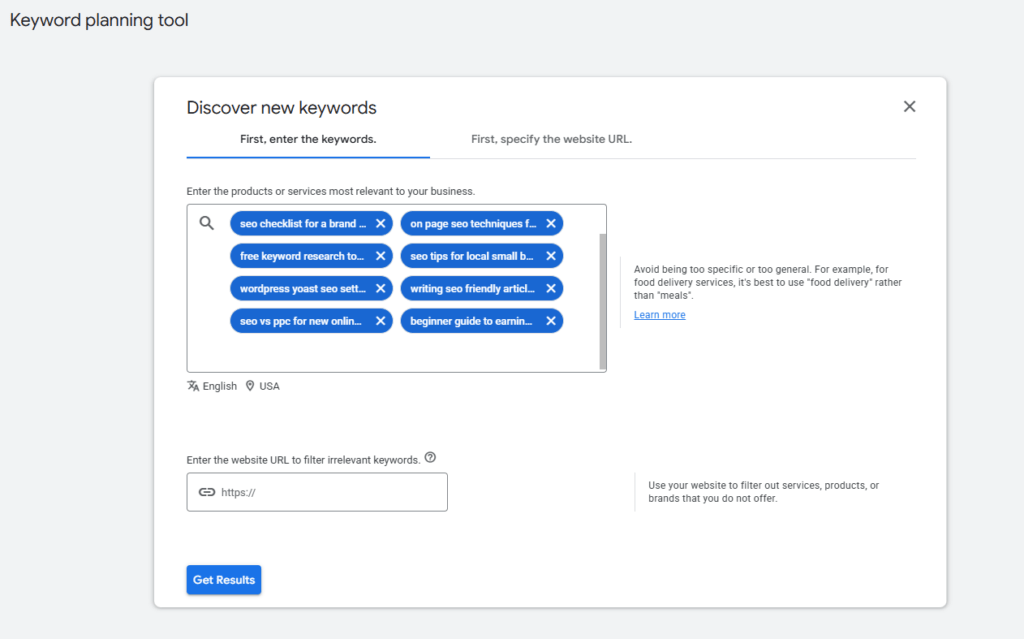
⚠️ Two common pitfalls:
| Pitfall | Why It Matters | How to Fix |
|---|---|---|
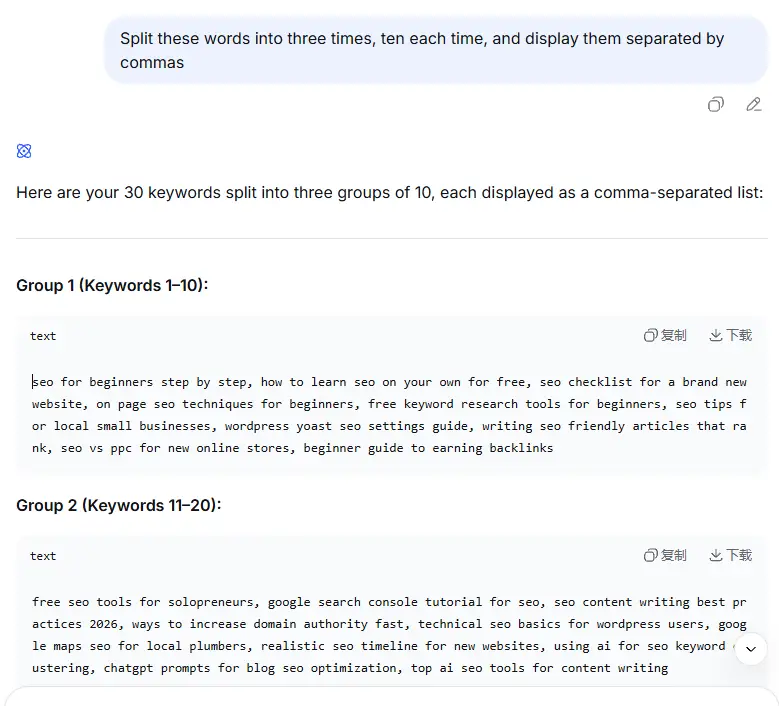
| GKP only allows 10 keywords per query | You can’t paste all 30 keywords at once | When generating the list in Step 1, ask AI to split it into three groups of 10, separated by commas |
| Language and location settings are easy to miss | Default settings may not match your target market, making the data useless | Before searching: set Language to “English” and Location to “United States” (or your target country) |
💡 You can copy and paste this prompt directly to your AI:
“Please split these 30 keywords into three groups of 10, separated by commas. I need to copy them into Google Keyword Planner in batches.”
This step is a coarse filter — it helps you quickly remove keywords that nobody actually searches for. Delete any with zero search volume immediately. Save or screenshot this data — you’ll need it later when you send it back to AI for analysis.
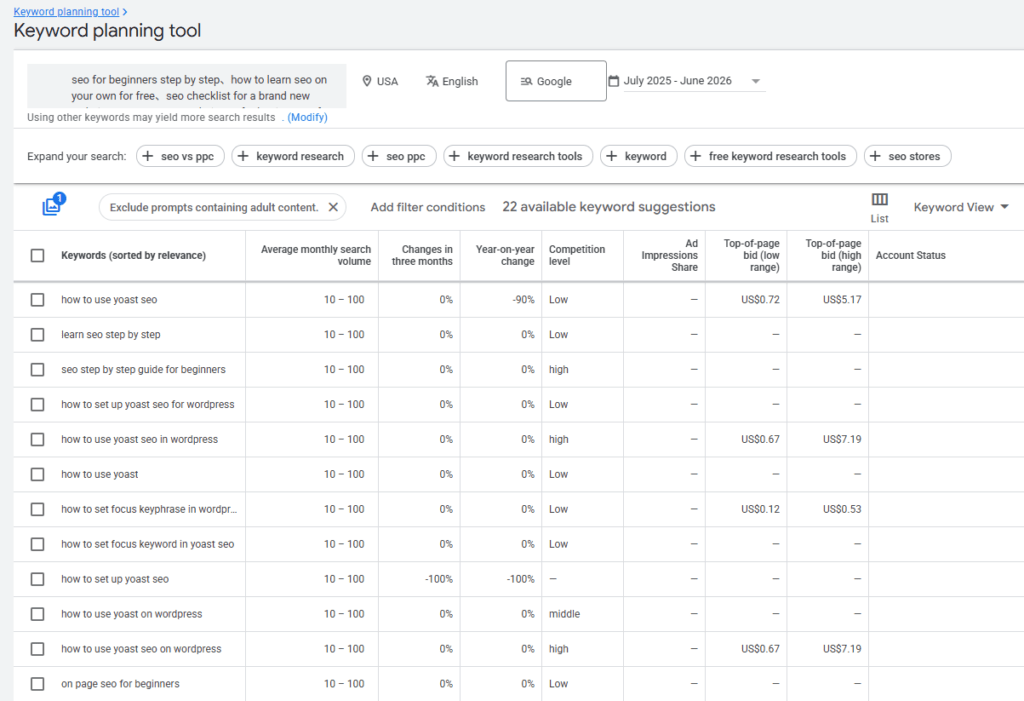
Next, apply your filtering criteria.
Keep only keywords with KD below 25 and search volume between 50 and 300. Most keywords outside this range can be set aside for now, unless you have a specific reason to prioritize them.
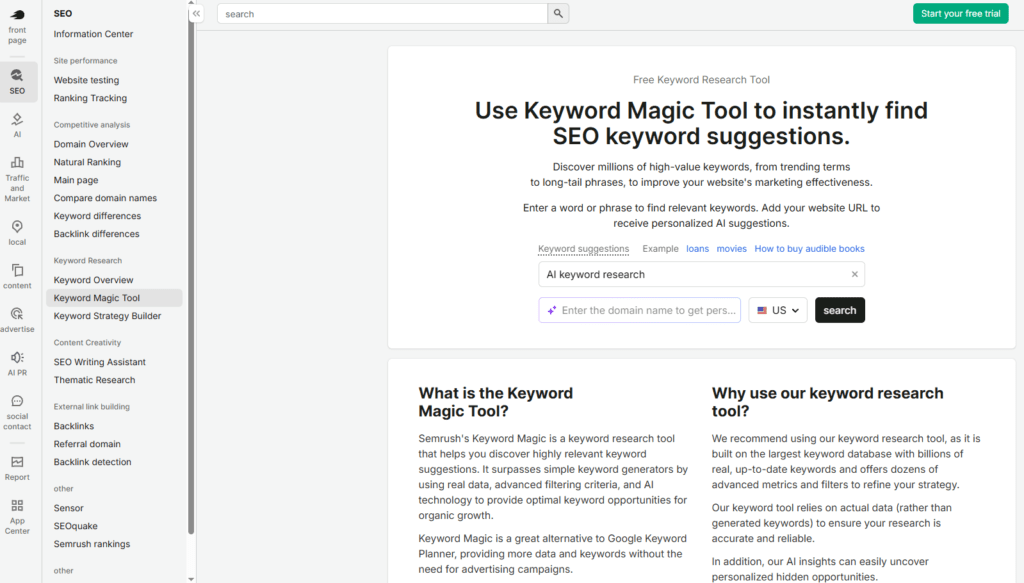
⚠️ Semrush free tier limitations:
- Only 10 queries per day
- Keyword Magic Tool only accepts one keyword at a time
So here’s what you do: pick the most promising keywords from your filtered list, and run them through Semrush one by one to get exact search volume and KD. Screenshot the results and save them alongside your Google Keyword Planner data. You’ll send both to AI in Step 3 for intent grouping and prioritization.
Step 3 — Let AI Analyze Intent and Prioritize
Now you have a verified keyword list. Search volume is real. KD is real. But there’s one question tools can’t answer: what does the person searching for this actually want?
Tools give you numbers, but they can’t read intent. They don’t know whether someone searching “AI keyword research” wants to learn a method, find a tool, or buy a course. Tools can’t tell you that. But AI can.
Intent classification is exactly the kind of task AI is good at.
Paste your verified keyword list back into your AI tool and use this prompt:
As an SEO expert, analyze the following keyword list and do two things:

1. Group them by search intent: Informational / Commercial / Transactional / Navigational

2. For each keyword, suggest a priority score from 1 to 5:
   - 5 = high search volume + low competition + relevant to my site
   - 1 = low relevance or too competitive

Here's the keyword list (format: keyword | search volume | KD):
[paste your keyword list here]
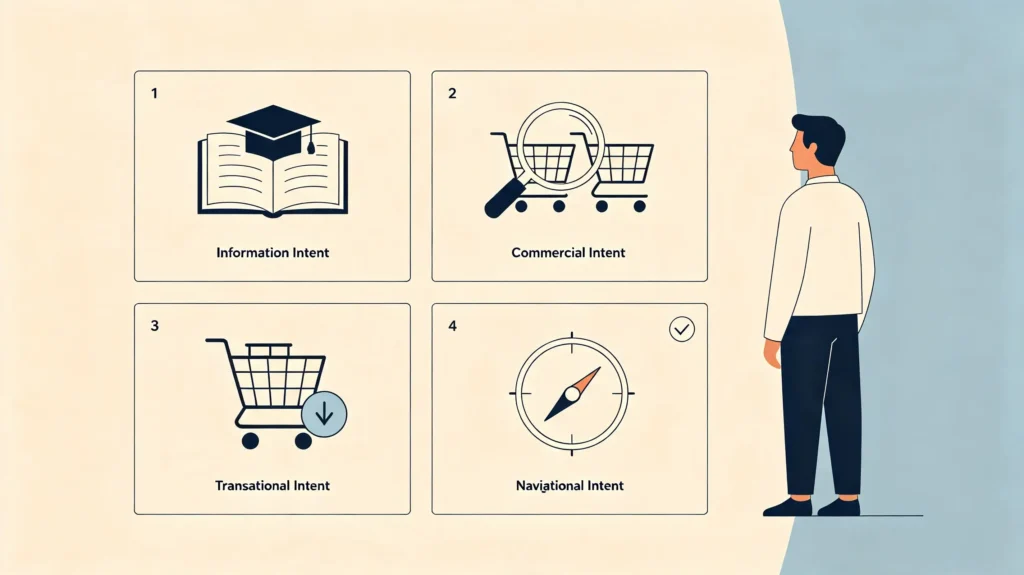
AI will group your keywords into four intent types. Here’s what each one means:
| Intent Type | User’s Goal | Example Keyword | Best Content Format |
|---|---|---|---|
| Informational | Want to learn | what is AI keyword research | Blog post, tutorial, explainer |
| Commercial | Want to compare | best AI tools for keyword research | Comparison post, review |
| Transactional | Want to buy | buy AI keyword research tool | Product page, pricing page |
| Navigational | Want to find a specific site | Semrush login | Homepage, brand page |
It’ll also give each keyword a priority score. Here’s what the scores mean:
| Score | Meaning |
|---|---|
| 5 | High search volume + low competition + highly relevant to your site |
| 4 | Good volume + moderate competition + relevant |
| 3 | Decent potential but lower relevance or higher difficulty |
| 2 | Low relevance or too competitive to chase right now |
| 1 | Not worth pursuing — drop it |
Here’s an example of what AI might return for a sample keyword list:
| Keyword | Intent | Priority Score | Why |
|---|---|---|---|
| what is AI keyword research | Informational | 5 | High volume, low KD, perfect for beginners |
| best AI tools for keyword research | Commercial | 4 | Commercial intent, medium competition |
| AI keyword research tutorial | Informational | 5 | Clear how-to intent, easy to rank |
| buy AI keyword research software | Transactional | 2 | Too competitive, save for later |
| Semrush AI keyword tool review | Commercial | 4 | Comparison intent, relevant to my audience |
| AI keyword research for ecommerce | Informational | 3 | Relevant but slightly off-topic for now |
Which group should you tackle first? That depends on your current goal. For beginner sites, start with Informational keywords — they have the gentlest intent, the most natural content format, and visitors are most likely to stick around and read more. Commercial and Transactional keywords can wait until your site has some authority — that’s when they convert best.
Step 4 — Map Keywords to Content (and to Your Site Structure)
Your keyword list is verified, intent is grouped, and priorities are set. Every keyword on this list is worth writing about. But “worth writing” and “knowing what to write and where to put it” are two different things.
This step solves that: turning these keywords into actual content and using them to figure out what your site structure should look like.
4.1 Map Keywords to Blog Posts
Pick 5 to 10 of the highest-priority keywords. Let AI assign primary and secondary keywords for each, and clarify the search intent. Once you have that, your job is to write the posts.
As for how to turn keywords into real SEO content, I’ve covered that here:
👉 How I Went from AI-Generated Fluff to Real SEO Content — and How You Can Too
This guide finds the keywords. That one turns them into articles.
4.2 Plan Your Publishing Calendar
With a keyword list ready, the next step is to plan your writing order and pace.
Tell AI your goal — say, “I want to cover these 10 keywords within three months.” Ask it to suggest which ones to write first, which to write later, and how many posts per week makes sense. AI is great at task planning — give it a time frame and it’ll give you a rough content calendar.
Also, while you’re writing, do one more thing — internal linking.
Every time you finish a post, link it to other relevant content on your site. For example, when I wrote this article, I linked to the previous piece — What Is Keyword Research? A Stress-Free Beginner’s Guide — which answers the “what is it” question. I also linked to How I Went from AI-Generated Fluff to Real SEO Content — and How You Can Too, which covers the “how to write it” question.
Together, these pieces form a complete SEO core workflow: Keyword Research → Content Creation → Technical SEO → Link Building → Performance Tracking. Readers get a clear path to follow, and Google can better understand how your content connects.
4.3 Build Your Site Structure from Keywords
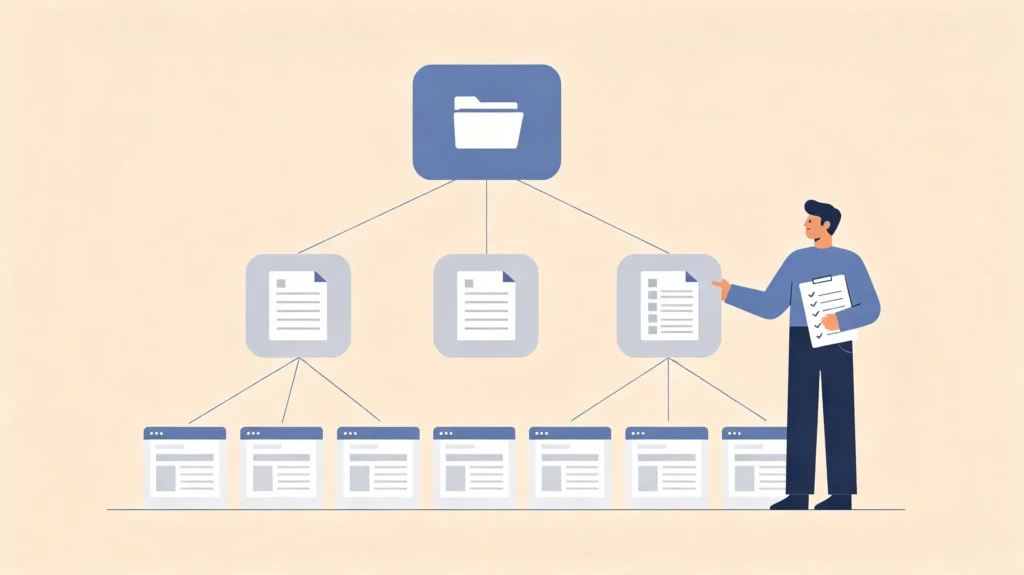
Your keyword list can do one more thing that many guides don’t mention — help you reverse-engineer your site structure.
Group your keywords by theme. For example, if you’re researching “AI keyword research,” you might end up with clusters like: AI tools, intent analysis methods, AI expansion techniques, and priority scoring standards.
| Theme Cluster | Example Keywords | Possible Category |
|---|---|---|
| AI Tools | best AI keyword tools, Semrush vs Ahrefs, free AI keyword generator | Tool Reviews |
| Intent Analysis | how to identify search intent, informational vs transactional keywords | SEO Fundamentals |
| AI Expansion | how to expand seed keywords, AI long-tail keyword generator | Keyword Research |
| Prioritization | keyword difficulty scoring, which keywords to write first | SEO Strategy |
Each cluster is a content topic that could become a category or a series. You don’t have to write everything at once — but now you know where your site is headed, rather than writing whatever comes to mind.
Topics naturally fall into layers. Broad core keywords belong on the homepage or main menu. Specific tutorial keywords go to blog posts or subcategories. Purchase-intent keywords belong on product pages or detail pages. Your navigation isn’t something you imagine — it’s something you extract from your keyword list.
With your current list, you can probably see two or three category directions. Note them down. You don’t have to overhaul everything at once — add them gradually with each update. Your site structure will get more complete over time.
What You’ll Have After This Step
- A keyword → title → outline mapping table
- A rough content publishing schedule
- At least one internal link you can add right away
- Ideas for how to adjust or expand your navigation
Recap: The 4-Step AI Keyword Research Cycle

That’s the complete AI keyword research process. Here’s a quick recap:cap of what you did:
| Step | What You Do | What You Get |
|---|---|---|
| Step 1: Expand with AI | Feed 3-5 seed keywords + competitor/community insights into AI | 30-50 long-tail suggestions with estimated intent |
| Step 2: Verify with tools | Run through Google Keyword Planner + Semrush, filter KD < 25, SV 50-300 | ~10 verified keywords with real data |
| Step 3: Classify intent with AI | AI groups by intent and assigns priority scores | Grouped keywords + priority list (1-5) |
| Step 4: Map to content and structure | AI drafts titles/outlines, reverse-engineer site nav, add internal links | Content plan + site structure ideas + internal links |
This isn’t a one-time process. Write a batch of content, then run it again in a few weeks. Your keyword list will get sharper. Your direction will get clearer. Your site structure will get more complete.
There’s only one core principle: Tools give data, AI does analysis, you make the decision.
Tools give you real numbers. AI helps you filter through hundreds of keywords and flag the ones worth a closer look. Then you decide what to write, when to write it, and where it belongs on your site.
Remember that, and the rest is just doing the work.
FAQ
Can AI completely replace traditional keyword research tools?
No. AI can’t provide real search volume or keyword difficulty data — it guesses based on language patterns. You still need tools like Google Keyword Planner or Semrush to verify actual numbers before making any decisions.
Which AI tool is best for keyword research?
DeepSeek, Claude, and ChatGPT all work well. I use DeepSeek because it’s free and has enough context to process 50–100 keywords at once. Pick whichever you’re comfortable with — the core functionality is similar.
What’s the difference between keyword research and content mapping?
Keyword research finds the terms people search for. Content mapping decides which terms go on which pages and how they connect to your site structure. Keyword research gives you the raw material; content mapping turns it into a site plan.
How many keywords should I target per article?
One primary keyword plus two to three related long-tail keywords. Don’t overstuff — Google’s algorithm is smart enough to understand context, and writing naturally is better than trying to hit a specific keyword count.
Do I need the exact tools you use?
No. Use whatever you’re comfortable with — Google Keyword Planner plus any AI tool is enough to run the full process. The workflow is what matters, not the specific tools.
How often should I do keyword research?
Weekly is ideal. Set aside 30 minutes to check for new terms in your niche, review your search console data, and refresh your keyword list. It’s a habit, not a one-time task.
How do I verify AI-generated keyword suggestions?
Run them through Google Keyword Planner first to check for actual search volume. Delete zero-volume keywords immediately, then use Semrush or Ahrefs free tier to verify search volume and KD for the remaining terms.
What’s a good KD score for a beginner blog?
Target KD below 25. Search volume matters too — aim for 50-300 monthly searches. This range gives you enough traffic potential without competing against high-authority sites you can’t beat yet.
References
- Ahrefs. (n.d.). Keyword Research: The Beginner’s Guide. https://ahrefs.com/seo/keyword-research
- Nightwatch. (2026). How to Use AI for Keyword Research: A 6-Step Practical Guide. https://nightwatch.io/blog/ai-keyword-research/
- Traffic Soda. (2025). 5 Things AI Still Gets Wrong About Keyword Research. https://www.trafficsoda.com/things-ai-gets-wrong-keyword-research/
- Semrush. (2026). How to do keyword research in 2026. https://www.semrush.com/blog/keyword-research/
- Moz. (n.d.). Keyword Research for SEO. https://moz.com/learn/seo/keyword-research
- Yoast. (n.d.). How to fix your keyphrase length. https://yoast.com/how-to-fix-your-keyphrase-length/

About Shelldy
An ordinary practitioner learning SEO from scratch. By day, I work in the internet industry; by night, I turn what I’ve learned into articles. I believe that honest learning records are more valuable than rehashed tips. Feel free to connect and exchange ideas.
Pingback: What Is Keyword Research? A Clear Beginner's Guide (Part 1)
Pingback: How to Improve SEO Score on WordPress: Complete 72-94 Guide
Pingback: WordPress SEO Checklist: Start with Google Search Console